How to Unlock Samsung Phone Forgot Password Without Reset [SOLVED]
Without performing a factory reset to delete everything, you can still unlock your Samsung phone when the password is forgotten.

Katrin Gray
Updated on Jun 5, 2026
Forgotten your Samsung password and stuck on the locked screen? It's a moment of panic—especially when you realize that a standard factory reset has become the only way to unlock a Samsung phone if you forgot the password, which will wipe every photo, message, and contact on the device.
Despite this strict security system, it's still possible to unlock Samsung phone forgot password without reset. In the past, Samsung Find My Mobile's direct unlock feature helps bypass the lock screen without losing data; and now in One UI 6.1 or later, the on-screen Previous Lock Reset solution is offered to skip the need for a complete reset and unlock Samsung without password. Users who have previously set up Extend Unlock feature can open the Samsung phone if forgotten password without resetting it.
Below will walk you through each method so you don't need to worry about how to unlock Samsung phone forgot password without factory reset or data loss, ensuring to regain full access and enjoy full functionalities.
If all the strategies for Samsung unlock without reset are not working for you, don't worry — we also cover the reset-based methods to get you back into your device, and one of a handy & efficient tools is Higospot Android Unlocker, which does a good job at unlocking Samsung Galaxy without the password you forgot.
Table of Contents
Can you unlock Samsung phone forgot password without resetting?
The answer is YES.
The simplest route is to check whether biometrics (fingerprint or face recognition) still work to get your Samsung phone unlocked even when you forget the security password. However, this doesn't work for a second-hand device that was locked by previous owner.
Samsung understands the pain of completely forgetting the device's password, and provides several ways that still work on modern Galaxy devices to let you unlock the screen without performing a reset or erasing data — but this depends on how your phone is configured.
If those no-reset methods can't unlock the forgotten password on Samsung, a factory reset is your only option to remove the screen lock and regain access. The good news is that, if you have a backup made through Samsung Cloud or Google Drive, you can restore your data to your clean-wiped device after the reset.
The new "Reset with Previous Screen Lock" feature (One UI 6.1 and higher)
For Samsung phone where you recently changed your lock screen password and then immediately forgot the new one, the easiest unlocking route without involving the factory reset is just to use the Reset with Previous Screen Lock function.
On devices running One UI 6.1 or above (like the Galaxy S24, S25, and newer series), Samsung stores your old lock screen data for 72 hours after a password change, allowing you to use it to get in and reset the forgotten password to something new with no need to factory reset the device.
Note: If you haven't changed your password recently or your phone is older, this option will not appear, making it impossible to use your previous password to unlock Samsung phone if you forgot the password.
1. Enter the wrong password, PIN or pattern 5 times until the "Forgot Password?", "Forgot PIN?" or "Forgot Pattern?" link displays on the lock screen.
2. Tap Forgot Password? link.
3. On the "Reset with previous screen lock" screen, enter your old password to unlock your Samsung device. Click OK to continue.
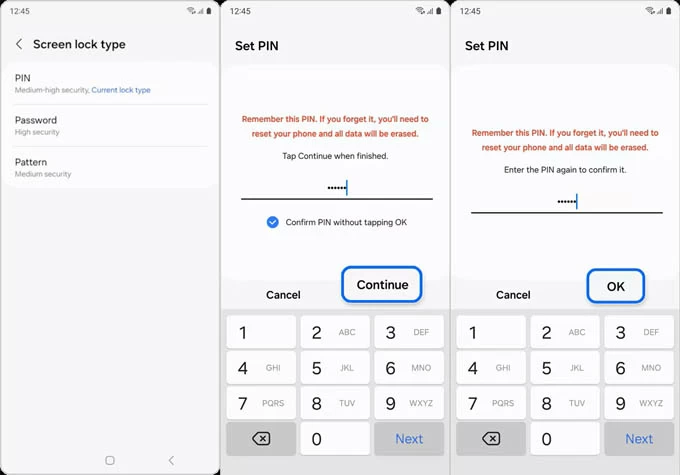
4. Once you get in, follow the onscreen wizard to choose a screen lock type (PIN, Password, Pattern).
5. Create your new password as your Samsung unlocking method. Click OK when finished.
Done! You successfully get into your Samsung phone without resetting even you can't remember the password.
Extend Unlock (formerly Smart Unlock)
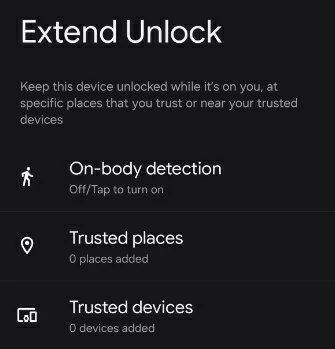
If Extend Unlock has been set up within Settings app before the lockout, your Samsung phone will automatically unlock in specific situations like trusted places or devices, or on-body detection. This is a simple bypass of when you forget the password for unlocking a Samsung without having to reset the phone or lose data.
For example, if you are currently at home or at your office, or if you are wearing a Galaxy Watch or have your phone connected to your car's Bluetooth, or if the phone was in your hand or pocket, Extend Unlock will trigger to get past the lock screen and unlock your Samsung device without requiring a password, pattern or PIN.
The one caveat: Enabling Extend Unlock feature can kick off an automatic unlock after forgetting Samsung phone password without a factory reset, but it will be potentially disabled if you ever restarted the device.
Samsung SmartThings Find (formerly Find My Mobile)
OUTDATED: Samsung Find My Mobile once came with Remote Unlock feature letting you to remotely unlock your phone without a password or without needing to reset the phone to factory settings. In case you have a Samsung Account logged into your phone, as well as "Find My Mobile" and "Remote Unlock" was enabled before you're locked out, then follow these steps on how to unlock a Samsung phone when forgotten password without erasing the device or data.
1. Go to Samsung Find My Mobile website on a computer or another smartphone.
2. Log in using the same Samsung Account credentials that are on your locked phone.
3. On the left sidebar, select your Samsung Galaxy device you are trying to unlock its password.
4. From the menu that appears, click Unlock option to bypass Samsung lock screen without reset.
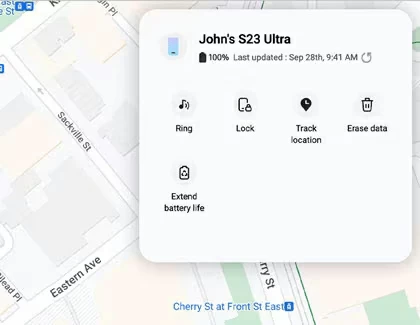
UPDATED: Since December 2023, Samsung has removed this Remote Unlock feature for security reasons. This means that you can no longer unlock the forgotten password on newer Galaxy devices without the need of a reset. Now, Erase Data is the only option left within SmartThings Find service, by which to reset a Samsung phone with forgotten password and get access back. Here's how.
1- Once you're in SmartThings Find website, sign into your Samsung account connected to your phone.
2- Choose your Samsung phone you forgot the password to.
3- Click Erase Data for a factory reset.
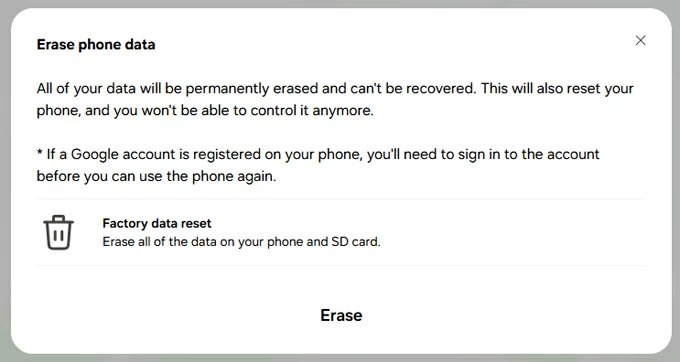
4- When prompted, click Erase and enter the associated Samsung account password to begin resetting your Galaxy phone and deleting the password you forgot, in an attempt to unlock the screen.
Other techniques available in earlier days like ADB command and Forgot Password/PIN/Pattern (Android 4.4 or lower) can work for unlocking a Samsung phone when you do not remember the password without a full reset.
Unfortunately, modern Samsung's security system is intentionally designed to protect your data from unauthorized access. This is why bypassing the Samsung galaxy lock screen without factory reset is technically impossible on modern, updated devices unless you use an authorized backdoor like "Reset with Previous Screen Lock", and "Extend Unlock".
Bonus: What if none of these no-reset strategies work for unlocking Samsung without password?
If all simple bypass tricks are in vain, you can still regain access to your locked Samsung phone by resetting it to original settings, in order to remove the forgotten screen password. Multiple Samsung phone lock removal tools claim to be able to unlock Samsung phone without passcode through a factory reset so that the device opens again, such as Higospot Android Unlocker, Android Recovery Mode, and the aforementioned SmartThings Find Remote Reset.
Higospot Android Unlocker
Higospot Android Unlocker is an easy-to-use Android unlocking tool designed to help users regain access to any locked Android phones and tablets including Samsung without technical skills. Whether you forgot your lock screen PIN, pattern, or password, the software provides a quick solution to remove all screen locks in minutes and unlock the device. Besides, the software can be used to bypass FRP lock after reset without verifying Google account credentials.
Win Download
When you're locked out of your Samsung phone after forgetting the password or buying a preowned device with screen locks enabled, Higospot Android Unlocker can help you removing the lock screen and regain access. The unlocking process is straightforward and requires only a USB connection between Windows computer and your Samsung Galaxy S25 and newer models, S24, S23, Z Fold series, A series, Note series, etc.
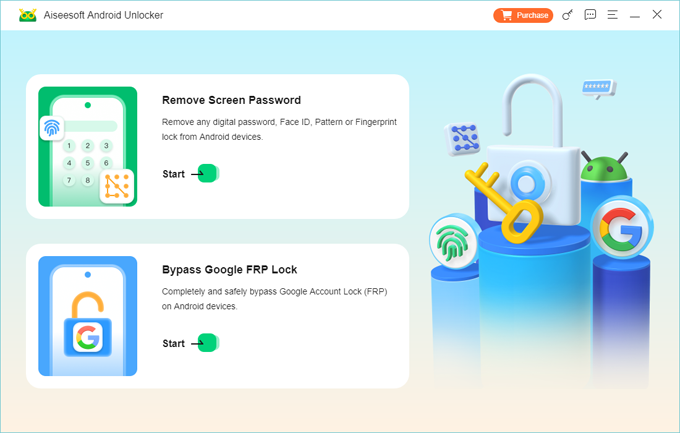
Step 1. Download and install Higospot Android Unlocker on your PC.
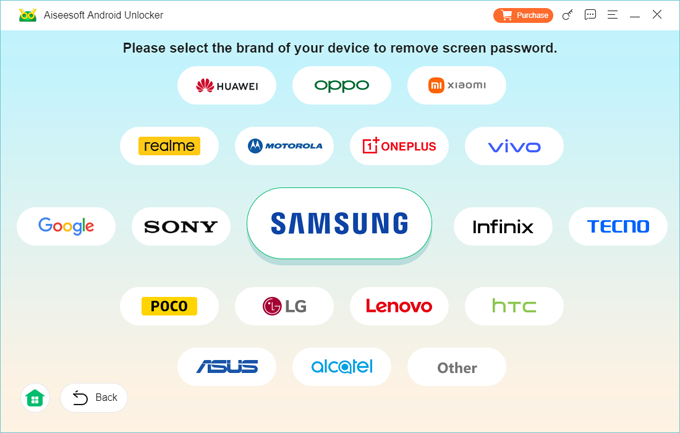
Step 2. Launch the program and choose Remove Screen Password mode, and then choose SAMSUNG to match your device's brand.
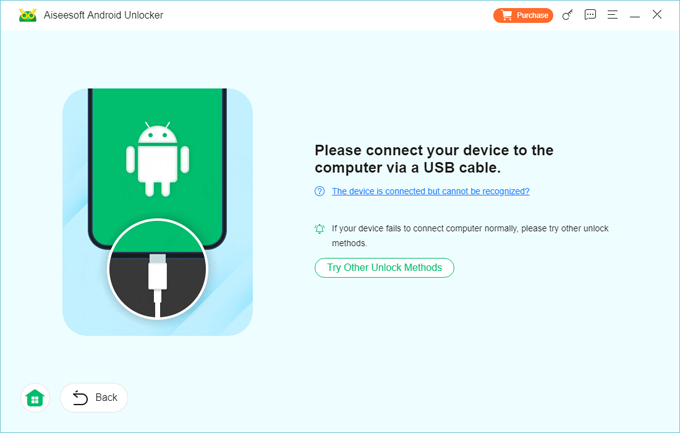
Step 3. Connect your Samsung phone to your computer using a USB cable.
If it's not recognized, follow the on-screen instructions to put the device into the recovery mode.
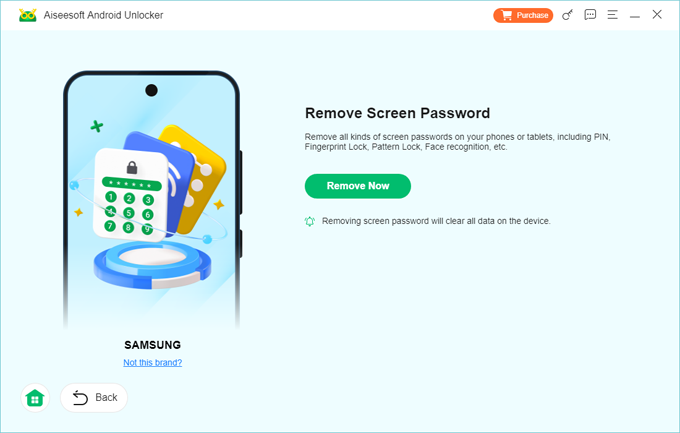
Step 4. When ready, hit Remove Now button. To remove the screen password you've forgotten to have your Samsung device unlocked, the tool will reset the device and erase all data including the lock method, returning it to a fresh new state.
Once completed, you're able to open your Samsung phone without a password. Simply set up the device from the scratch and create a new password. If you have ever backed up your device, you can restore your data from the backup.
Android Recovery Mode
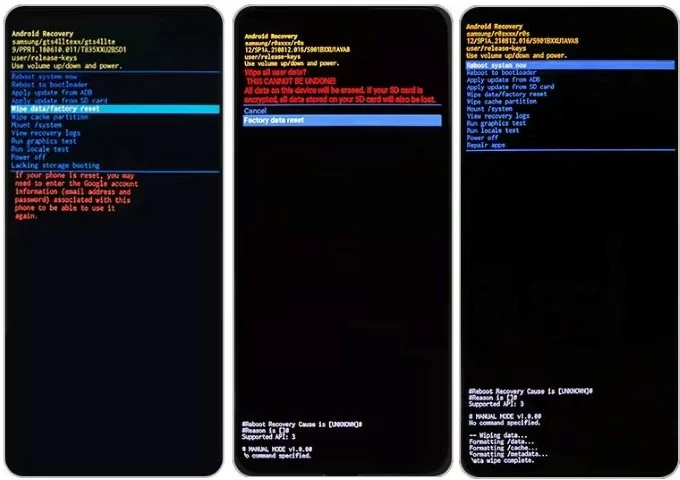
Android Recovery Mode is a built-in maintenance environment available on Android devices, including Samsung phones and tablets. It runs separately from the main Android operating system and allows users to perform troubleshooting tasks in the event that the operating system is malfunctioning or the access to the device is locked due to a forgotten password on Samsung Galaxy.
After accessing the recovery menu, you can use the "Wipe data/factory reset" option to complete the Samsung forgot password unlock with a reset, which risks at losing any data if you have no backup available.
Here's how to unlock Samsung phone without password by erasing the screen lock through a factory reset using Android Recovery Mode.
1. Power off your phone. If you can't do a standard shutdown, press and hold the Power + Volume Down buttons for several seconds to force the device to turn off.
2. Plug the device into a computer via USB cable. This is a necessary step for many modern Galaxy S21 and newer models to access recovery mode.
3. Enter Recovery Mode by pressing physical buttons for a few seconds. The button combination depends on your Samsung model:
- Newer Samsung phones without a Home button - Volume Up + Power
- Samsung phones with a Bixby button - Volume Up + Bixby + Power
- Samsung phones with a Home button - Volume Up + Home + Power
Release the buttons when the Samsung logo appears.
4. Now, you should see the Android Recovery menu. Use the Volume buttons to move through the option for a factory reset and the Power button to confirm action.
- Choose Wipe data/factory reset.
- Select Factory data reset. The phone will erase all data and remove the lock screen password, PIN, or pattern.
- After the reset finishes, select Reboot system now.
Your Samsung phone will restart like a new device without the password you cannot remember.
Important notes for Samsung unlock with a reset
- While both Higospot Android Unlocker software and Android Recovery Mode's Factory Reset successfully unlock a Samsung phone password even it's been forgotten, it also results in permanently deleting all user data, making previous backups important.
- If your Samsung phone has been previously backed up to Samsung Cloud or Google Drive, you can restore your data during the setup.
- Devices protected by Google FRP may require the original Google account credentials after reset.
More to read: How to bypass Google FRP lock on Samsung phone
FAQs
- Is there a universal "Samsung lock screen bypass code"?
- No. There is no master code (like 0000 or 1234) that can unlock a Samsung phone. Samsung removed the ability to use "emergency call codes" to bypass security years ago to prevent theft.
- Can you unlock Samsung forgot password without losing data?
- Sometimes yes. The possible solutions that are still workable on modern Samsung Galaxy phones and tablets involve Biometrics, One UI 6.1 Reset with Previous Screen Lock, and Extend Unlock.
- Can Samsung unlock my phone without reset?
- No. Even Samsung technicians cannot skip the factory reset when you forgot your lock screen password, and bypass phone's encryption.
About Katrin Gray
Katrin Gray is the Junior Editor at HigoSpot. With a bachelor's degree in Computer Applications, he has been covering Microsoft Windows, Apple macOS, iOS, Android, Social Media, Gaming, and more as a professional writer for over 5 years.

 iPhone UnlockerRemove iPhone & iPad lock screen
 iPhone Data TransferTransfer and manage your iPhone & iPad data
 Android UnlockerRemove Google FRP lock and bypass screen locks
 iPhone Data RecoveryRecover deleted files from iPhone, iPad
 Location ChangerFake a GPS location easily
 Video DownloaderDownload videos from 1000+ sites